Skin 30 - Liquid Gradient
Overview
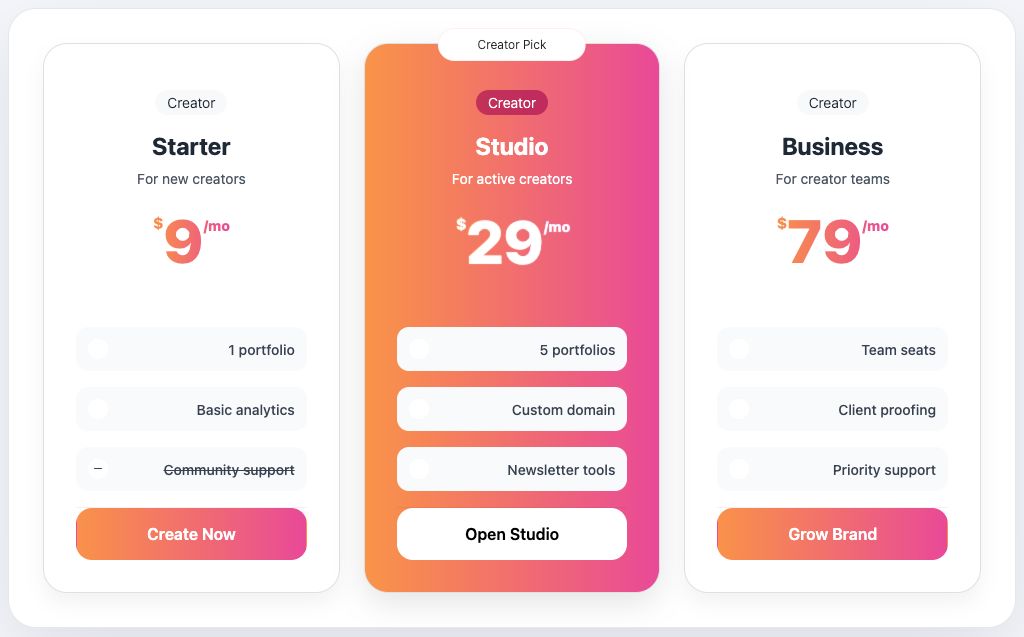
Skin 30, Liquid Gradient, has a fluid, colorful, and expressive presentation. It belongs to the Gradient family and works best when the pricing section should feel intentional rather than generic.
Availability
Available in Fusion Pricing Tables Pro.
Best for
- creator tools
- events
- fitness plans
- modern agencies
Design notes
- Liquid color movement
- Playful gradient tone
- Strong visual personality
- High emotional appeal
Suggested content style
Use short plan names, clear prices, and benefit-focused feature labels. This skin works best when each plan has a similar amount of content so the cards stay visually balanced.
Customization tips
- Use benefit-focused copy
- Avoid too many plan columns
- Keep CTAs simple
- Match page accents to the gradient
Elementor setup
- Add the Pricing Plans widget.
- Open the Pricing Plans section.
- Set Choose Skin to 30 - Liquid Gradient.
- Update plan titles, prices, features, badge text, and button links.
- Use the Style tab to match colors, spacing, typography, borders, and buttons to your brand.
Upgrade note
This design is intended for customers who want more visual variety than the 15 included free skins. Keep the upgrade message calm and benefit-led: more design choices, better brand fit, and faster pricing-section setup.