Fusion Pricing Tables Documentation
Welcome to the official Fusion Pricing Tables documentation. Fusion Pricing Tables is an Elementor pricing table widget for building clear, responsive, conversion-focused plan comparisons without writing code.
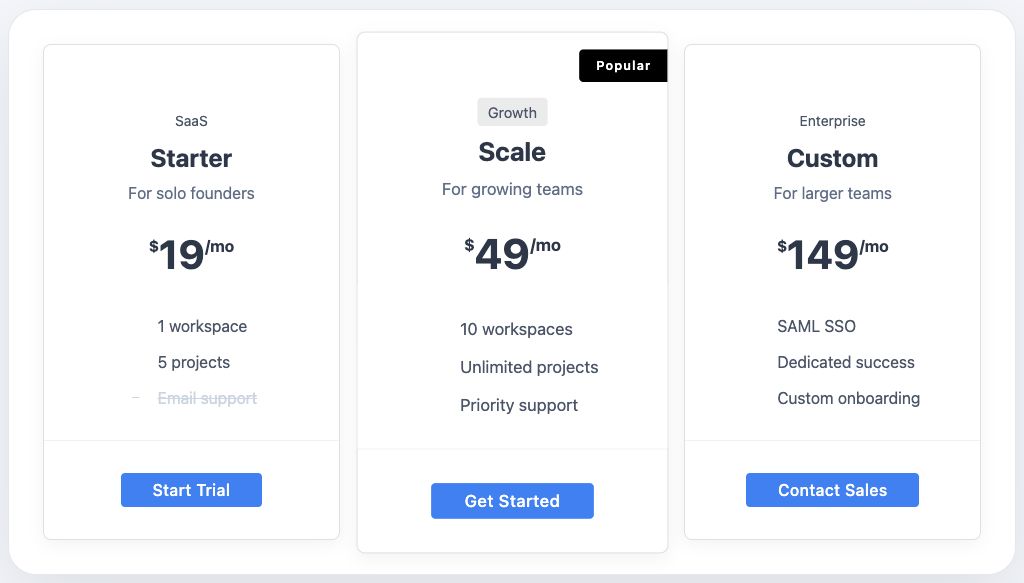
The free version includes 15 ready-made skins, monthly/yearly pricing support, repeatable plans, feature lists, ribbons, buttons, and responsive styling controls. Fusion Pricing Tables Pro adds 35 additional skins and advanced styling controls, giving you 50 skins in total.
Quick start
If you are setting up Fusion Pricing Tables for the first time, follow this path:
- Review the requirements.
- Install and activate Fusion Pricing Tables.
- Open a page with Elementor.
- Search for the Pricing Plans widget.
- Choose a skin and update your plan content.
What you can build
- Pricing tables for SaaS, agencies, services, memberships, hosting, and product packages
- Monthly and yearly pricing layouts with a clean billing toggle
- Recommended plan cards with ribbons and badges
- Feature lists with enabled and disabled states
- Branded designs using Elementor typography, color, spacing, border, background, and button controls
- Lightweight pages where frontend assets load only when the widget is used
Product editions
| Edition | Included skins | Best for |
|---|---|---|
| Free | 15 | Launching polished pricing sections with Elementor |
| Pro | 50 total | More visual variety and deeper styling control |
Explore the skin library
The skin library is the fastest way to choose the right starting point for your pricing section. Each skin page includes a design-only screenshot, best-fit use cases, design notes, customization tips, and setup guidance.
Common tasks
- Add the Pricing Plans widget
- Configure plans and pricing
- Manage feature lists
- Highlight a recommended plan
- Compare Free and Pro
- Read frequently asked questions