Skin 27 - Neumorphic Dark
Overview
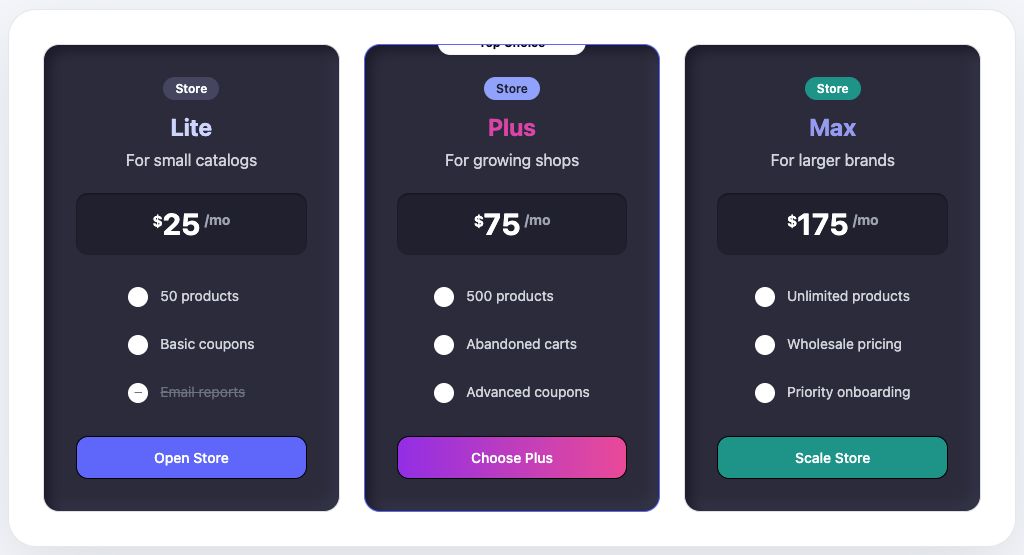
Skin 27, Neumorphic Dark, has a smooth, moody, and app-like presentation. It belongs to the Neumorphism family and works best when the pricing section should feel intentional rather than generic.
Availability
Available in Fusion Pricing Tables Pro.
Best for
- developer tools
- music apps
- dashboards
- subscription products
Design notes
- Dark tactile surfaces
- Soft shadow depth
- Modern control-panel mood
- Distinctive premium feel
Suggested content style
Use short plan names, clear prices, and benefit-focused feature labels. This skin works best when each plan has a similar amount of content so the cards stay visually balanced.
Customization tips
- Use bright accent buttons
- Keep text sizes generous
- Use concise features
- Avoid low-contrast gray text
Elementor setup
- Add the Pricing Plans widget.
- Open the Pricing Plans section.
- Set Choose Skin to 27 - Neumorphic Dark.
- Update plan titles, prices, features, badge text, and button links.
- Use the Style tab to match colors, spacing, typography, borders, and buttons to your brand.
Upgrade note
This design is intended for customers who want more visual variety than the 15 included free skins. Keep the upgrade message calm and benefit-led: more design choices, better brand fit, and faster pricing-section setup.